


Use Case: Explorer
Instantly Locate and Verify Inventory Data
Summary
The ItemPath Explorer instantly transforms inventory management by giving Floor Supervisors and Managers real-time, 360-degree visibility into the entire warehouse. It eliminates the costly and time-consuming process of manually searching for and verifying material data, transactions, or stock levels. The main outcome is empowered teams that can resolve discrepancies and confirm inventory data with absolute certainty.
Persona
Floor Supervisor, Warehouse Operations Manager
Challenge
Lost time and delayed order fulfillment due to the inability to quickly locate the exact location, quantity, or system status of a material needed for an urgent pick or order verification.
Feature and Solution
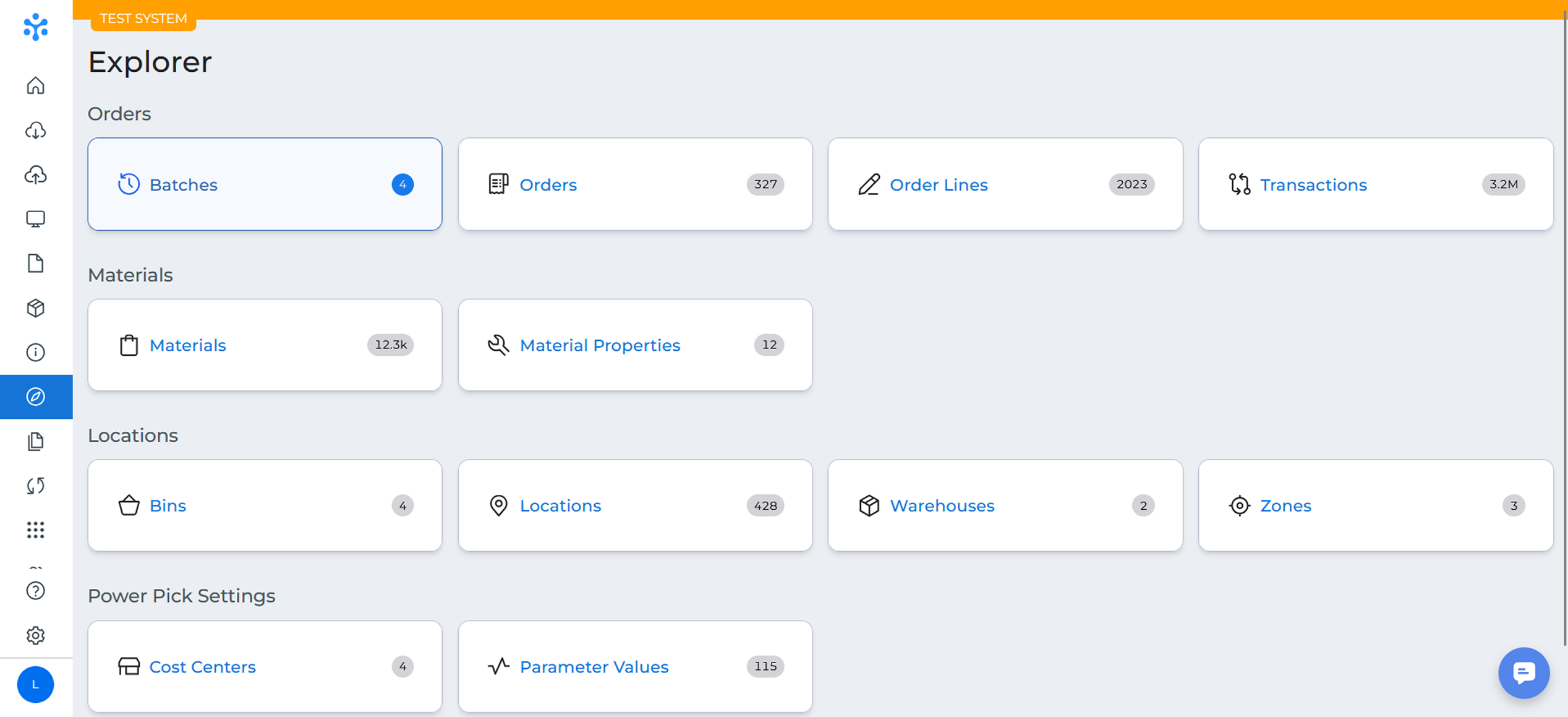
The Explorer provides simplified, user-friendly data views in clear tables, acting as your direct window into the entire storage environment. Users can easily find any data in their storage units, including materials, orders, and transactions. You simply select a view from the sidebar and use an intuitive search function to pull up critical details like descriptions, expiry dates, and actual fill levels. It also features a Warehouses view to provide immediate, at-a-glance status and capacity information for all automated storage machines.
Example:
A Floor Supervisor needs to quickly verify the stock and exact location of a high-priority material, “PN-9511”, and ensure enough inventory is available for the next major production run.
Navigate to the Explorer: The Supervisor clicks the Explorer tab in ItemPath to access the single source of truth for all warehouse data.
Select Data View: They choose the Materials view from the left sidebar to focus the search on inventory items.
Search and Locate: The Supervisor enters “PN-9511” into the search bar. The table instantly filters, displaying the current total quantity and specifies every physical tray and bin where the material is stored.
Color-Coded Quantities: The visual presentation of a rack provides a clear indication of how much content is in each of its containers. Increasingly darker shades of blue indicate how full each section is. Empty containers are displayed as white, and full
Verify Status: If the Supervisor needs to check why stock levels are low, they can switch to the Transactions view to review the material’s history and ensure all outbound processes were successfully exported to the ERP.
Problem Solved: The Supervisor instantly confirms the material is in the correct locations with the right quantity, eliminating delays and preventing a costly line stoppage.
Key Results and Benefits
The ItemPath Explorer is the ultimate single source of truth for your digital warehouse, ensuring your team is always working with verified, real-time data. This powerful visibility solution eliminates costly manual checks, turning instant data access into a competitive advantage for your operation. Start leveraging the Explorer today to transform your time spent searching into time spent processing orders and maximizing throughput!
Top Capabilities
- Instant Data Search & Filter: Provides immediate visibility into all data points (materials, locations, orders, transaction) across the warehouse ecosystem.
- Visual Capacity Overview: The Warehouses view uses intuitive color-coding to show VLM tray and bin capacity at a glance, immediately highlighting areas that are full or under utilized.
- Transaction History Visibility: Quickly review a full history of transactions to verify process completion and easily identify any transactions that failed to export to the host ERP system.
Operational Benefits
- Maximize Team Productivity: Eliminates hours spent on manual audits or system cross-checks, allowing personnel to instantly verify data and focus entirely on high-value tasks like picking and replenishment.
- Optimize Storage Density: Enables Managers to make data-driven decisions on material placement, consolidating materials in one area to drastically improve space utilization.
- Accelerate Error Resolution: Drastically reduce troubleshooting time by allowing users to find non-exported transactions and resend them, immediately resolving integration issues and keeping data in sync.
Additional Resources
To learn more about leveraging the Explorer, here are some useful resources:
Master Data Discovery
Learn how to navigate your warehouse data with total flexibility. This guide covers how to use Explorer to search, filter, and drill down into specific transactions or inventory levels without building a formal report.
Navigate Your Operations
Master the core functions of ItemPath Explorer with this step-by-step course. You’ll learn how to leverage the intuitive search engine to find the exact data points you need and save custom views for rapid daily access.
