


Use Case: Data Push
Real-Time Data Synchronization Between Power Pick and External Systems
Summary
ItemPath Data Push serves as powerful, flexible middleware, automating the synchronization of completed Power Pick transaction records to external Enterprise Resource Planning (ERP) or Warehouse Management Systems (WMS). It ensures that physical inventory, order, and material data remain accurate and consistent across all enterprise systems in real-time, eliminating manual exports and batched transfers.
Persona
Inventory Control Specialist
Challenge
Data integrity issues and operation lag caused by manual or batched synchronization processes between the Power Pick system and the primary ERP/WMS. The Inventory Control team is burdened by time-consuming, manual uploads and data reconciliation tasks.
Feature and Solution
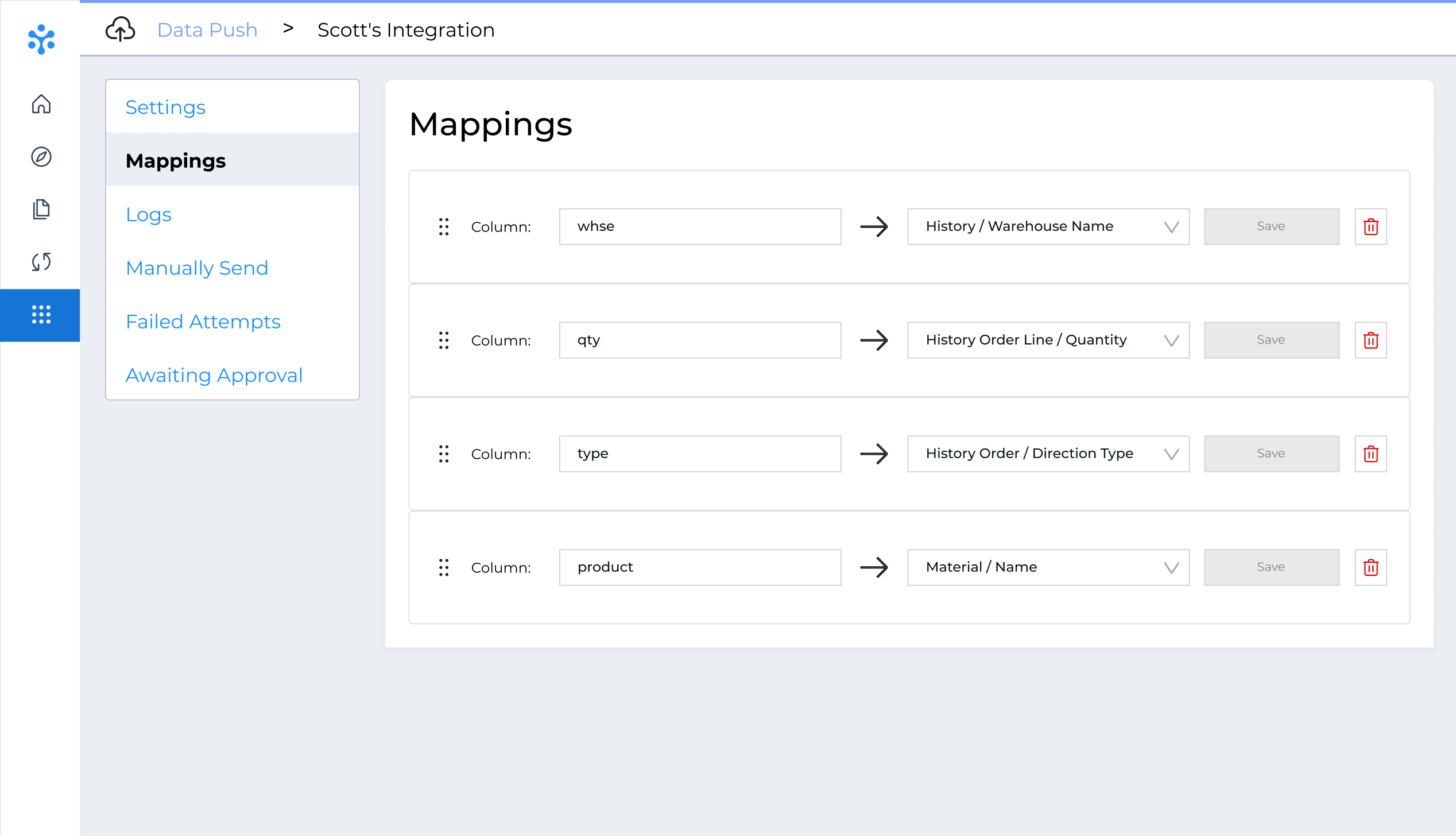
ItemPath Data Push allows users to configure dedicated integrations to external JSON APIs (endpoints). It operates based on customizable triggers, ensuring transaction data is pushed immediately upon completion. We have successful integrations with a wide array of systems, including AMOS, Business Central, Epicor P21, Infor M3 w/ Boomi, JD Edwards w/ Orchestrator, MBA w/ Mulesoft, NetSuite, Priority, and Oracle OIC / JD Edwards. Users can set up advanced filtering to select which transitions to send (e.g. completed Pick orders) and utilize a mapping interface to precisely match Power Pick data fields (Material ID, Quantity) to the corresponding fields required by the ERP/WMS.
The app also tracks integration logs, failed attempts, and allows for manual resends to ensure every record is successfully synchronized.
Example:
A high-volume medical parts distributor relies on their WMS for final inventory reporting and invoicing. When a Pick order is completed in their VLM, the WMS must be notified immediately to update the available inventory and trigger the next step in the fulfillment process (like printing a shipping label).
Setup: The ItemPath administrator configures a Data Push integration, connecting ItemPath to the WMS’s API endpoint. They map the Power Pick fields to the required WMS confirmation fields.
Execution: A warehouse operator completes a Pick order for 10 units of Material X in Power Pick.
Synchronization: ItemPath Data Push identifies the completed order and sends a confirmation record that 10 units of Material X were picked.
Result: The WMS inventory is updated in near real-time, preventing the risk of overselling the item or delaying the shipping process. If the WMS API fails to respond, the transaction is logged as a Failed Attempt in Data Push, allowing the administrator t
Key Results and Benefits
By automatically pushing transaction data, ItemPath Data Push removes data bottlenecks, enhances data integrity, and enables true, real-time visibility for the entire organization.
Top Capabilities
- Real-Time API Integration: Automatically connects ItemPath transactions to external JSON API endpoints.
- Field Mapping: Intuitive interface for precisely mapping Power Pick data fields (e.g. Order Name, Material Name, Confirmed Quantity, Motive Type) to external system fields.
- Transaction Filtering: Configure specific filters to control exactly which transactions are pushed (e.g. Picking Orders, Cycle Counts, etc.).
- Failed Attempt Logging: Maintains a detailed log of all attempts, allowing administrators to view and manually resend any transaction that failed to be processed by the external API.
Operational Benefits
- Instant Inventory Accuracy: Immediately updates inventory levels in the ERP/WMS upon transaction completion, preventing stock discrepancies and supporting accurate business decisions.
- Streamlined Order Fulfillment: Ensures that confirmation records are sent without delay, speeding up the overall fulfillment lifecycle.
- Reduced Manual Intervention: Eliminates the need for manual data exports, CSV uploads, or batch jobs, freeing up IT staff and reducing human error.
- Superior Data Integrity: Provides a dedicated mechanism to track and recover failed synchronizations, ensuring every crucial transaction record is confirmed in the destination system.
Additional Resources
To learn more about setting up and configuring the Data Push application, here are some helpful resources:
Master the Integration
Learn how to configure seamless connectivity between Power Pick and your external systems. This guide covers connection settings and how to map data fields for precise synchronization.
Streamline Your Data
Master the setup and configuration of the Data Push application with this step-by-step course. You’ll learn how to create custom triggers, apply transaction filters, and manage failed attempts to ensure total data integrity.
