Use Case: Data Pull
Data Pull for Inventory and ERP Systems
Summary
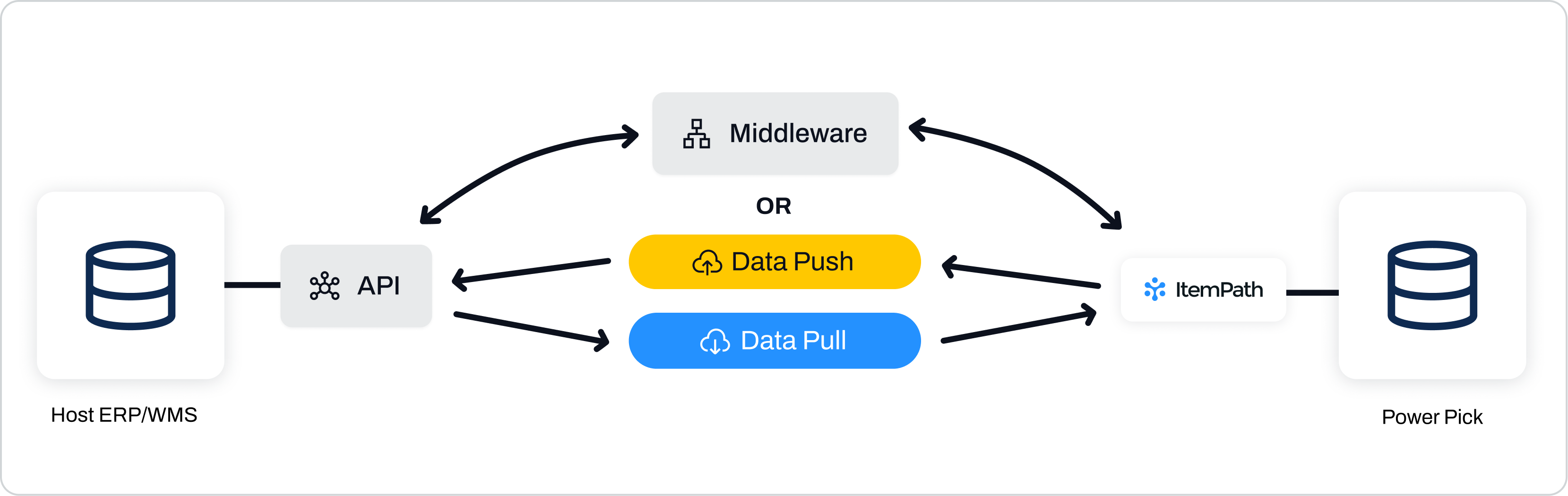
ItemPath Data Pull acts as a robust middleware, establishing a live, two-way bridge between the Power Pick host and any external system (like ERP and WMS). By constantly monitoring and synchronizing material and transaction data, it eliminates delays, providing reliable, real-time data accuracy essential for efficient order fulfillment and strategic planning.
Persona
IT System Administrators
Challenge
Current data transfer relies on scheduled batch exports or manual intervention, leading to delays, data inconsistencies and inaccurate inventory visibility for planning.
Feature and Solution
ItemPath Data Pull provides automated, secure integration, starting with the ability to automatically import new material and order data from major Enterprise Resource Planning (ERP) systems like Netsuite, Epicor, Priority, Costpoint, or CDK. The feature utilizes a sophisticated mapping system to ensure fields from the external data source match up perfectly with the expected Power Pick data structure. The system automatically checks the external source for new data based on a schedule you define, eliminating the need for complex, unstable database scripts.
Example:
An IT Systems Administrator needs to set up a new integration to pull material data from their ERP system and automatically push it to Power Pick whenever new materials are created or existing materials are updated.
A connection is first configured in ItemPath's settings to the ERP's API, providing the base address and required authentication information.
A new Data Pull Integration is created, specifying the Type as "Material" and selecting the newly created connection.
The polling frequency is set to 10 seconds. This ensures new materials are created in real-time, avoiding delays with orders due to missing materials in the database.
Within the integration, the administrator defines the field mappings, linking the ERP's material properties (e.g., MaterialName, QuantityAvailable) to the corresponding fields in the Power Pick data model.
After testing the connection and mapping to ensure data integrity, the integration is activated and ItemPath begins automatically checking the ERP every 10 seconds for new material data to import.
Key Results and Benefits
Data management is now streamlined and reliable. ItemPath Data Pull simplifies the most complex integrations, acting as the centralized engine that powers consistent operations. By providing all systems with precise, real-time information, it ensures high data reliability and efficient execution across your entire warehouse ecosystem.
Configurable Mapping and Authentication: Establish secure links to external systems (APIs, databases) by configuring a base address and supported authentication types.
Granular Data Selection: Drill down to the exact data required, filtering and selecting specific data fields and records, minimizing payload size and transfer time (e.g., pulling only material names and quantities).
Top Capabilities
- Adjustable Polling Frequency: Set the integration's polling rate, which determines how often ItemPath checks for new data. This can be configured globally, or individually for each Integration (with a minimum frequency of 10 seconds).
- Flexible Data Structure Handling: Easily process and map data regardless of its complexity, handling both simple flat files and complex nested/hierarchical data (like JSON or XML payloads) from enterprise APIs.
- Order Line Management: Specialized settings, such as ‘append lines’ and ‘group by’ logic, ensure accurate handling and processing of multi-line items and complex line-level data received from the external system.
Operational Benefits
- Smooth Inventory Synchronization: Eliminate the data gaps inherent in batch transfers, ensuring external systems always operate with the most current and reliable data for inventory, materials and orders. This provides certainty for efficient fulfillment, scheduling, and strategic planning.
- Effortless IT Management: Substantially reduce IT maintenance and the dependency on custom scripting. By replacing fragile, file-based transfers with a centralized integration platform, the administrator can reallocate significant time from troubleshooting into strategic tasks.
- Enhanced System Integration: Allows non-Power Pick systems (like ERP, WMS, BI) to consume only the data they need, increasing the performance and stability of both the host and the external applications.
Additional Resources
To learn more about getting setup with the ItemPath Data Pull integration, here are some useful resources: