


Consolidating Orders and Order Lines *NEW*
This document applies to consolidating Orders and Order Lines in ItemPath version 3.5.0 and later. For consolidating in ItemPath 3.4.10 and earlier, click here.
For ItemPath 3.5.0 and later, Data Push can send either one Power Pick transaction at a time, or combine multiple related records into one payload.
When consolidation is enabled, one payload can represent multiple PowerPick records. Use loop mappings when the receiving system needs those repeated records as a list, keyed object, or calculated total.
Consolidation Options
Configuring Loop Mappings by Consolidation Level
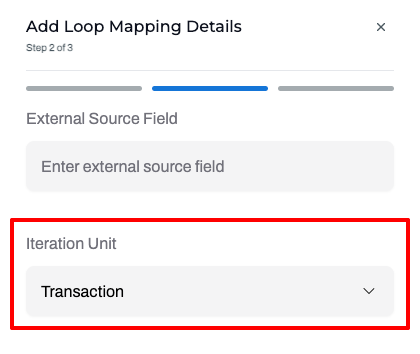
Consolidate Lines
- Iteration Unit: Select Transaction to loop over individual transactions belonging to the order line.
- Common Use Cases:
- List or Array: Send transactions as an object array or list of transaction IDs.
- Keyed Object: Send a transaction-keyed object.
- Aggregates: Send a calculated total across transactions (e.g., confirmed quantity total or transaction count).
Consolidate Orders
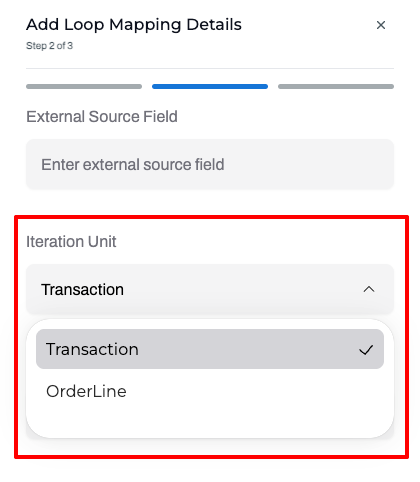
- Iteration Unit: Select based on the required level of detail:
- OrderLine: Sends one object per order line.
- Transaction: Sends detailed transaction history across all transactions in the order.
- Common Use Cases:
- Calculated Totals: Use an aggregate loop to calculate and send a single total (e.g., total order quantity).
- Order-Level Data: Place order-level fields (e.g., Order Number) outside of loops so they apply to the entire payload rather than repeating.
When to Use a Loop Mapping
Use a loop mapping when a field can have multiple values in one consolidated payload.
Some fields should be mapped inside the loop and others can stay outside the loop because they have one value for the whole consolidated payload.
Iteration Unit
The Iteration Unit controls which records a loop repeats over when generating a consolidated payload.
Output Modes
The Output Mode controls how a loop mapping formats repeating data in the outgoing JSON payload.
Object Array
Behaviour: Outputs a list of JSON objects containing key-value pairs.
When to use: When each repeated record requires multiple fields (e.g., line number, material, and quantity).
Example:
{
  "lines": [
    {"lineNumber": 1, "material": "A100", "confirmedQuantity": 2},
    {"lineNumber": 2, "material": "B200", "confirmedQuantity": 4}
  ]
}
Primitive Array
Behaviour: Outputs a flat list of single, unmapped values.
When to use: When the receiving system only needs a list of individual values (e.g., transaction IDs or material numbers).
Example:
{
  "transactionIds": ["txn-1", "txn-2", "txn-3"]
}
Keyed Object
Behaviour: Outputs a JSON object where each record is keyed by a unique identifier.
When to use: When the receiver looks up repeated records by ID rather than reading a list.
Note: Supported keys depend on the Iteration Unit.
- Transaction loop --> History ID
- OrderLine loop --> Order Line ID
Example:
{
  "transactionsById": {
    "txn-1": {"confirmedQuantity": 2},
    "txn-2": {"confirmedQuantity": 4}
  }
}
Collapse Single Item
Behaviour: Available for single-value loops used for legacy-compatible (pre-3.5.0) payload shapes. When enabled, if the loop contains exactly one record, Data Push sends the single value directly instead of wrapping it in an array or collection.
When to use: Only if your external system expects a plain value for single-record cases and a collection for multi-record cases.
Example without collapse:
{
  "transactionResults": {
    "txn-1": "confirmed"
  }
}
Example with collapse:
{
  "transactionResults": "confirmed"
}
Aggregate
Behaviour: Outputs a single calculated value across all repeated records instead of listing them.
When to use: When the receiver needs summary metrics like total quantities, averages, or counts.
{
  "totalConfirmedQuantity": 6
}
Quick Selection Guide
When you need... Recommended mapping One value for the whole order or line Column, expression, or constant outside a loop Several fields for each repeated transaction or line Loop with Object Array One value from each repeated record Loop with Primitive Array Values grouped by transaction id or order-line id Loop with Keyed Object One calculated total/count/min/max/average Loop with Aggregate
