
-
Support

- Why are new Orders not coming through?
-
Account & Licensing

-
Installing & Updating
-
Power Pick Connections
-
Users & Permissions
-
Data Push & Data Pull
-
API
-
Order Processor
-
Reports
-
Snapshots & Dashboard
-
Workflows
Why are new Orders not coming through?
If you notice a delay in new orders appearing in ItemPath, it does not always mean the integration is broken. Often, the system is simply processing a high volume of data in the order that was received. Alternatively, there may have been a large number of Orders or Materials imported from a separate integration.
The Symptom: "The integration isn't picking up my new orders."
If you send 10 new orders and they don't appear in ItemPath or PowerPick, your first instinct might be to check for a connection error. However, if a massive event (like 33,000 orders) was triggered just before your 10 orders, those new orders are sitting at the back of a very long line.
Bottlenecks: Why does this happen?
ItemPath processes tasks sequentially and all incoming requests from your ERP or middleware are placed in a queue.
Because the speed is limited to what a single PowerPick Web Services user can handle, a massive spike of orders creates a "clog" that can take hours to clear. During this time, any fresh orders sent to the system will appear to be "missing" because they haven't reached the front of the line yet.
How to tell if your integration is "Clogged" vs. "Broken"
A clogged integration will show a large quantity of Queued Tasks in the Data Pull integrations's Tasks view.
If you see that the number of Queued Tasks is not decreasing over time, this is a sign that something may be wrong with the integration.
What should you do?
The most important question is whether or not the large amount of tasks was imported intentionally. If the answer is yes, your best course of action is to wait for the tasks to be processed and the queue to be cleared.
If a large number of tasks were imported in error, they can be cancelled by following these steps:
- Disable the integration: If the integration is automatically polling for Orders or Materials, it needs to be turned off - otherwise ItemPath will immediately re-import the cancelled tasks.
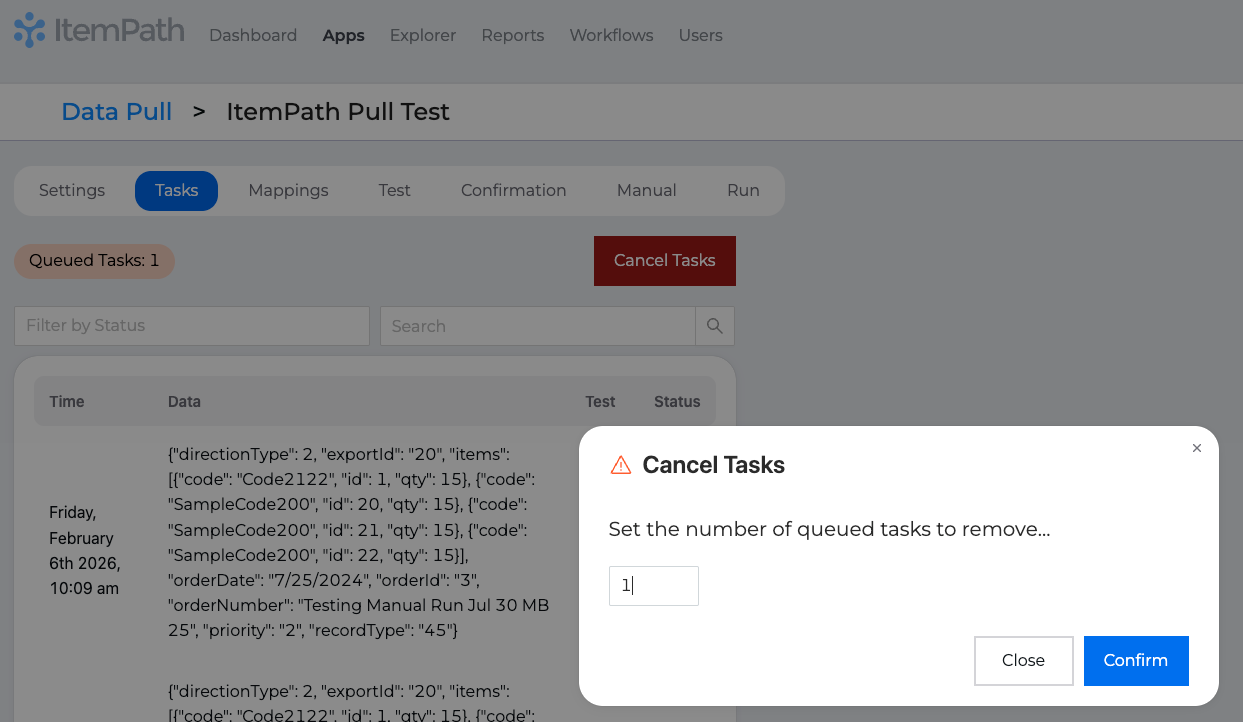
Cancel Tasks: Navigate to the Tasks tab, click Cancel Tasks, set the number of queued tasks to remove, and click Confirm.
- Clean up Orders / Materials in your external system: Make the necessary changes in your external system to prevent the integration from automatically importing the tasks again.
- Enable the integration: Turn the integration back on so that there is no interruption to your regular workflow.